
FX Trading
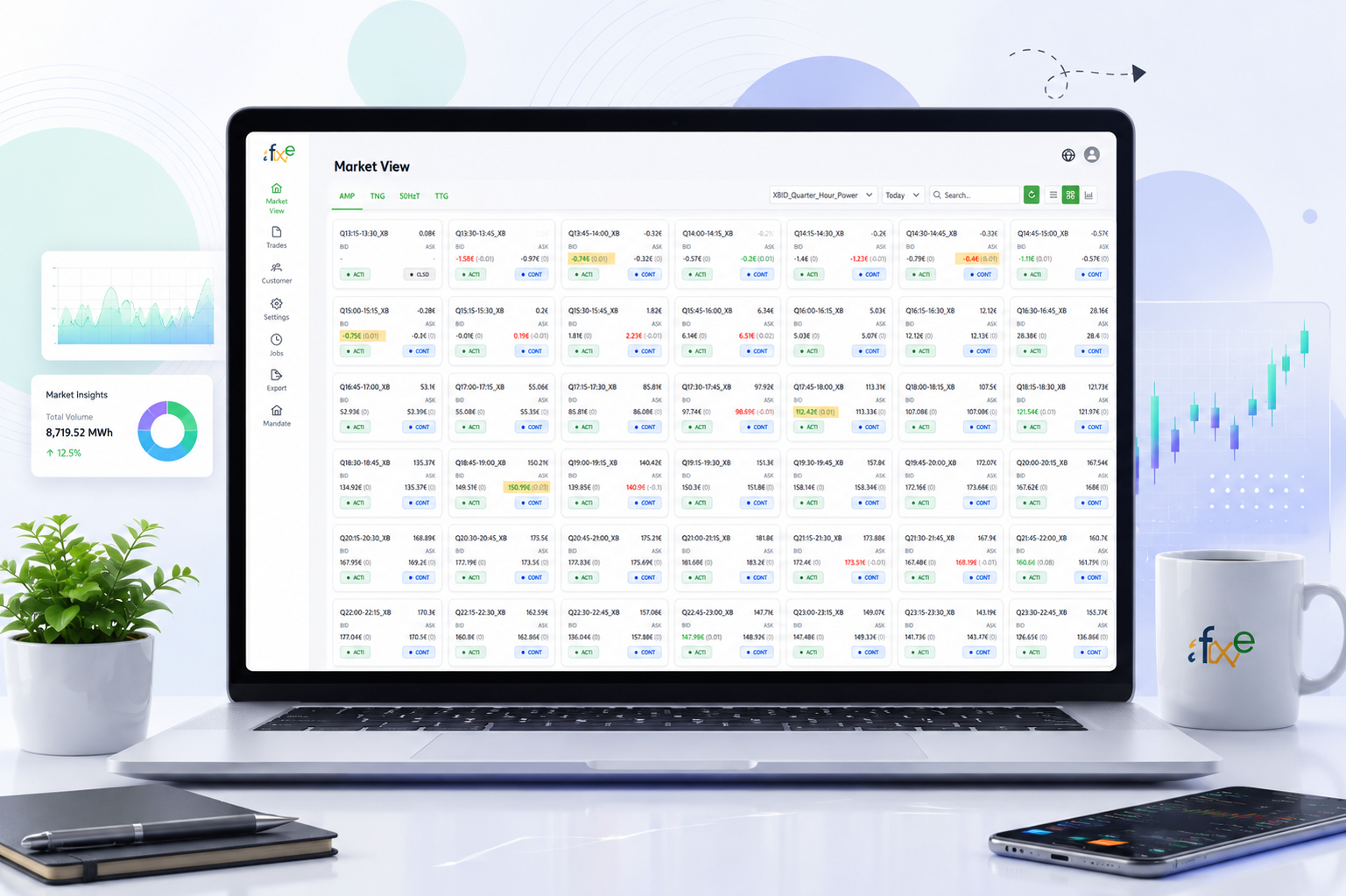
Automated Energy Trading & Market Management Platform
FX Trading ingests client trading orders from SFTP, network drives, and OneDrive, applies configured trading strategies, submits to the M7 platform, and monitors market data and trade status in real time — on web and mobile.
FX Trading automates the full path from a client’s order file to an executed, monitored trade on the M7 platform. Orders arrive from whichever source a client uses — SFTP, network drive, or OneDrive — get processed against a configured trading strategy, and submitted automatically. A background monitoring component keeps market data and trade status current, visible on both web and mobile.
The objective of FX Trading is to provide a scalable and automated trading ecosystem that connects client order sources with the M7 trading platform. By combining automated file ingestion, configurable trading strategies, continuous market monitoring, order and trade tracking, mobile access, and reusable mandate configuration, the platform enables efficient management of trading operations across multiple clients.
A full trading desk on web. Live status on mobile.
Web Application
- Dynamic role and permission management
- User and access management
- Trading configuration and setup
- Order and trade monitoring
- Market data monitoring
- Automated trading job management
- Mandate and company configuration
Mobile Application
- View current market information
- Monitor active orders
- View order status
- Monitor executed trades
- Track trading activities on the move
Three sources, one destination — M7.
Wherever a client’s orders come from, they end up processed the same way.
SFTP Order Processing
SFTP
Read Trading File
Extract Orders
Apply Trading Strategy
Submit to M7
Network Drive Processing
Network Drive
Read File
Extract Order Information
Apply Strategy
Submit to M7
OneDrive Processing
OneDrive
Read Trading File
Process Orders
Apply Strategy
Submit to M7
One architecture. Configured per client, not rebuilt per client.
A new client onboards through a setup form, not a new codebase.
1
Enter Client Configuration
Client-specific details are entered.
2
Define Required Parameters
Trading and processing parameters are set.
3
Configure Mandate
The mandate is built from those parameters.
4
Activate
The mandate goes live on the platform.
5
Ready for Client
The client can begin submitting orders.
From a client's order file to a monitored, executed trade.
The complete path, regardless of which source the order arrived from.
1
Client Order File
A client’s trading order file is ready to be picked up.
2
SFTP / Network Drive / OneDrive
The configured source connector picks it up.
3
M7 Order Submission
Orders are submitted to the M7 trading platform.
4
Trading Strategy
The configured strategy determines how orders are handled.
8
Validation
Extracted orders are checked before processing.
7
Market Monitoring
Background processing tracks live market conditions.
6
Order & Trade Tracking
Order status and executed trades are continuously tracked.
5
Web & Mobile Monitoring
Status is visible to users on both surfaces.
Everything a multi-client trading desk needs to run itself.
Web-Based Trading Portal
Full configuration, monitoring, and mandate control.
Dynamic Roles & Permissions
Access scoped precisely to each user's responsibility.
Automated SFTP File Processing
Order files picked up and processed without a person involved.
Network Drive File Processing
A second, equally automated ingestion path.
OneDrive Integration
Cloud storage as a first-class order source.
Client Order File Processing
Consistent handling no matter the source format.
Automated M7 Order Submission
Validated orders reach M7 without manual entry.
Strategy-Based Trading
Orders processed according to configured trading rules.
Continuous Market Data Monitoring
An always-on view of current market conditions.
Order & Trade Monitoring
Live status on every order and every executed trade.
Background Processing
Monitoring that runs independent of any open session.
Mobile Application
Market and trade visibility on the go.
Multi-Company Mandate Configuration
One architecture, reused across every client.
Reusable Client Onboarding Setup
New clients configured, not custom-built from scratch.
Ready to Build Your Next Big Thing?
Let's discuss your idea and turn it into a powerful digital product.